"Ujex 46 will take maintenance from 19-26 April so I'm sorry if not reply your message"

Easiest way for make startup program


Don't laugh at me, this is only for sharing and original from me.
I don't know how to make startup program and someone use tune up utilities for that but for me there is easier than it.
First choose the software, mp3 or games that you want to launch when you computer on
than make the shorcut of it to Startup folder in the start menu,yeah that is the end
you can try its succes or no with restarting your pc


Read More...... Digg!

Make your windows XP surfing faster

Do you know that windows XP use 20% speed of our internet connection? that is use for windows update, and if you want make it become 0%
you must do this:
* Click "Start" and then "run"
* type "gpedit.msc"
and it will make policy editor windows out
*go to “Local Computer Policy” > “Computer configuration “
> “Administrative templates” > ” Network “
> ” QOS Packet scheduler , in the right view “Limit reservable bandwidth properties ” > tab “setting”
and chose "enable" than change 20% to 0%

but in windows XP SP2 you will get other word, but I think you can found it because the way is still same


Read More...... Digg!

Simple way to get Windows XP Admin's Password

yeah, if you are a student or a worker in a institution, the computer will be usually protected by password and usually using windows XP OS

there are many way to get the administrator password, but I only want to make you know the simple one, and it isn't work if the admins has disable the regisrty or control panel button

ok Check this out:
1. Go to the Control Panel
2. after that click peformance and maintenance( if there isn't it click the administrative tools)
3. Go to administrative tools
4. your monitor will display like this:

5. OK go to computer management and follow this picture instruction
6. in picture above, you can change all the user password
7. after click the "SET PASSWORD" you will get the proceed password window, and click proceed
8. you will enter the new password without entering the old password

maybe it will be help you
Read More...... Digg!

Delete Your Googleupdate.exe in Windows XP and Vista

When you install Google applications like Chrome or Desktop onto your computer an exe named GoogleUpdate.exe is also included in the package. This runs in the background and checks for updates for Google’s programs. This pesky little updater runs as a process in Windows XP and Vista and chews up valuable memory! Since everyone knows that having too many running processes can slow your computer down, it makes sense to disable Googleupdate completely. Here's how you do it:
- Go to your Control Panel -> Scheduled Tasks( if you using windows XP,you must go to peformance and maintenance in the control panel, and you will get the schedule task)

- Select GoogleUpdateTaskUser
- Then right-click GoogleUpdateTaskUser and click Delete. This will prevent the task from relaunching itself.
- To remove the active process, right-click on the your taskbar and select Task Manager from the context menu.

- Within task manager, select GoogleUpdate.exe and click the End Process button. Confirm when the dialog box appears.

- Then right-click GoogleUpdateTaskUser and click Delete. This will prevent the task from relaunching itself.
- To remove the active process, right-click on the your taskbar and select Task Manager from the context menu.

- Within task manager, select GoogleUpdate.exe and click the End Process button. Confirm when the dialog box appears.

source : telkomek

Read More...... Digg!

Make Your Windows Vista shut down services faster


Windows Vista can, after a while take progressively longer and longer to shut down. This is due to applications that install services that start at boot time and then take ages to stop and sometimes time out when Windows is being shut down. Luckily for us, there is a way to force Windows to shut down these services much quicker. Doing this will make Vista shut down much faster!


Here's how you do it:

- Press Windows key + R (This will bring up the Run dialog)

- In the Run dialog box type regedit and press Enter

- Navigate to: HKEY_LOCAL_MACHINE\SYSTEM\CurrentControlSet\Control

- On the right hand window pane you will see multiple string values.

- Look out for one called WaitToKillServiceTimeout. It should have a default calue of 20000. This represents 20000 millisconds or 20 seconds.
- Double click on WaitToKillServiceTimeout and change the value to 5000(Any lower value could cause system instability and likely errors)

- Click OK and we're done!

You can now close the Registry Editor window.

Source : telkomek
Read More...... Digg!

Make a text art with Ascii generator

$$\ $$\ $$$$$$\
$$ | $$ |$$ __$$\
$$ | $$ |$$ / \__|
$$$$$$$$ |$$$$$$$\
\_____$$ |$$ __$$\
$$ |$$ / $$ |
$$ | $$$$$$ |
\__| \______/


oh, look it, first time i see the picture with text i was very surprise, how a person can draw it?????
maybe only a little person could.
and after i make an opinion that people draw it with a computer program,
and it's true,
,and now there is many generator for this like:
Patorjk
and you could search with search engine too with tag's name: art text/picture


Read More...... Digg!

Trojan Horse Deactivates Genuine Windows Copies!


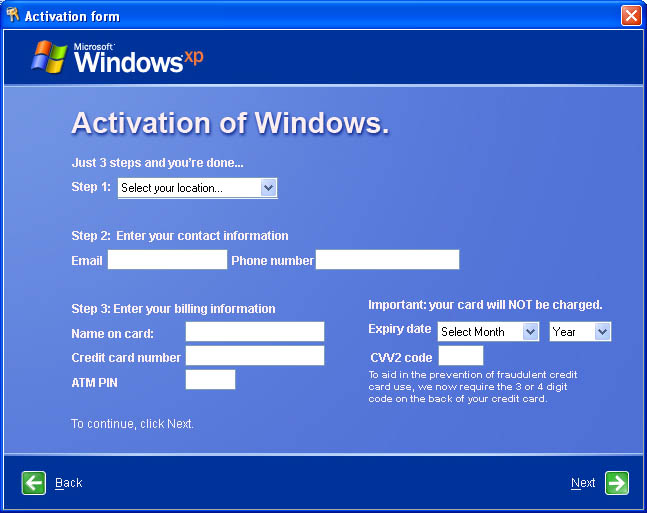
Trojan.Kardphisher is a Trojan horse program that deactivates genuine and previously activated copies of Windows following the infection. Security Company Symantec has warned on the spreading of
Trojan.Kardphisher, and revealed that the malicious program is not a technical masterpiece, but that it is focused on social engineering techniques. The catch is that the malicious code does not actually deactivate genuine copies of Windows 2000, Windows 95, Windows 98, Windows Me, Windows NT, Windows Server 2003, Windows XP, either activated or not.

After compromising a system, the malware becomes active with the first Windows boot and displays a message with the title "Microsoft piracy control" just as in the adjacent image. The Trojan informs the users that their copy was activated by another person and asks them to repeat the activation process.
Source Luis
Read More...... Digg!

Game Cooking Mama get Protest


This game is usually cooking played same girl children's children, but, it appears the game is to get protests from some residents american


source:
Read More...... Digg!

FOR FM LOVERS

whether friends about playing football manager
What's less but I especially like the online features Here's the game sometimes difficult to directly use it well,

Let's we play together


Read More...... Digg!

My computer attacked by Trojan

be careful...

This day is bad for you have antivirus software that is weak or not at all
every time you open the website, antivirus I (eset NOD32 v.3) captures the Trojan
type the name of the Trojan Downloader
http://do.qwertyy.cn/do.htm

friends, you must also be concerned at the bar down the browser if you use the browser mozilla
for the friends that I the construct way, I commend
NOD32 only cathch but not kill it to its roots, so I surf every continue doing so ...


Read More...... Digg!

Windows 7 have 20 versions


Read More...... Digg!
Copyright © 2009 " Ujex46 " | Design by Jakfar Shahab, 
Contact for more info